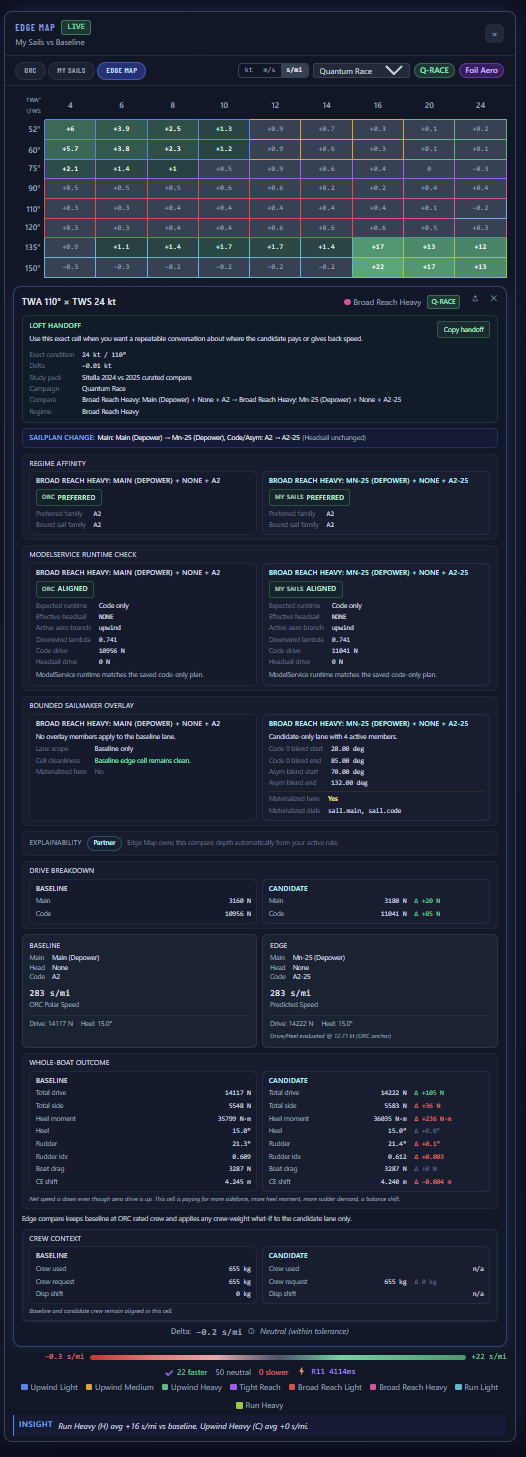
The SailEdge™ Edge Map doesn’t hand you a number and ask you to trust it.
Tap any cell and see everything behind the delta — which sail drives it,
what the whole boat paid for it, how confident the model is, and what physics
produced it.
Nothing is a black box.
Which sail drove itMain, headsail, or code sail. Force decomposed per sail.
What the whole boat paid for itHeel, rudder demand, drag, wave lane status, and balance shift — not just the raw sail force.
What changed between baseline and edgeThe delta, attributed. Not just the number — the reason.
Per-Sail Attribution
Which sail made the difference?
Every cell in the Edge Map is a speed delta. But a delta has parts.
The drive breakdown shows you how much each sail contributes —
main, headsail, and code sail — independently.
Tap a cell and the model shows drive force per sail: how much forward push
each produces, how much side force and heel it creates, and what that means
for the combined picture. The panel now also carries a whole-boat outcome read:
when a code sail adds drive but gives the gain back through heel, rudder demand,
drag, wave lane behavior, or balance shift, you see that too.
Negative drive detection matters here. If a sail is producing drag instead
of drive at a given angle, the breakdown flags it explicitly. No hidden
penalties — every force is on the table.
Confidence
The model tells you when it’s sure — and when it’s not.
Not every cell carries the same confidence. When the physics approach a
boundary condition — publication fencing limiting the published gain,
a baseline sail plan that’s underpowered for the angle, missing approved
wave input, or high rudder demand eating into the delta — the Edge Map
tells you.
Amber-tinted cells mean the delta is real but boundary-limited. The amber
intensity scales with severity: a light tint means a minor constraint is
active, a strong tint means multiple boundaries are compressing the result.
Each amber cell includes a plain-language attribution — not just
“low confidence” but specifically which boundary triggered it.
This isn’t hedging. It’s transparency. A +0.4 kt delta with no
amber is a cleaner result than a +0.4 kt delta with three active constraints.
The Edge Map lets you tell the difference.
Sanity Checks
What the model won’t show you.
Some cells don’t deserve a number. When the model detects an unstable
sail combination — a reaching kite selected at an angle where it would
produce drag instead of drive, or a configuration outside the sail’s
effective wind range — the cell renders grey instead of green or red.
Grey means the model suppressed the result rather than display a misleading
delta. No false positives. No phantom gains. The Edge Map only paints a
number where the physics support one.
The Aero Model
Not a lookup table. A physics model.
The deltas in the Edge Map come from a per-sail aerodynamic model that
computes lift, drag, drive, and heel for each sail independently —
then combines them with hull resistance, heel equilibrium, and rudder
correction to produce a boat speed.
Modern planforms credited. The model distinguishes sail shapes:
a squaretop main gets different planform treatment than a pinhead, because the
area distribution aloft changes both the lift curve and the center of effort.
Blockhead and high-roach designs are recognized and credited for the geometry
they actually have.
Material and shape metadata. When sailmaker-provided aero
metadata is available — cloth family, construction method, shape retention
characteristics — the model uses it. When it isn’t, conservative
defaults apply. Either way, the model is transparent about what it’s
working with.
Sail interaction. When the
mainsail shadows the headsail at deep angles, the model reduces headsail
effectiveness where the physics demands it. Combined configurations —
staysail under an asymmetric, for example — are modeled together, not
sail-by-sail. Transitions between upwind and
downwind modes are continuous — no checkerboard artifacts from hard
regime switches.
Regime blending. As the wind angle sweeps from upwind through
reaching to downwind, the aerodynamic character of each sail changes. The model
blends coefficients smoothly across regimes rather than switching abruptly at
a fixed angle.
The methodology pages go deeper. This section tells you what
the model considers. The methodology tells you how.
For Partners
Expert Mode — for those who want the full readout.
Partners and advanced users get a deeper diagnostic layer. Expert Mode exposes
the decoded confidence attribution behind every amber cell, composite
center-of-effort tracking across the full sail plan, whole-boat outcome,
wave-lane disclosure, and per-sail aerodynamic diagnostics that go beyond
drive and heel.
This is the layer where sailmakers validate model behavior against their own
design intuition — and where SailrScience refines the model based on
real-world feedback under NDA.
Interested? Expert Mode is available through our
partner program.
Change the crew weight and every cell in the Edge Map recomputes. The delta
isn’t a single number — it’s a per-cell RM supplement that shows how much
righting moment changed, and a crew mode label (Windward Rail, Blended,
Centerline Low) that shows where the crew sits at each wind angle.
Lighter crew gains on reaches where less displacement helps, but pays upwind
where less righting moment limits drive. Heavier crew reverses the story —
more RM on the rail means more stability in medium and heavy upwind air.
The Edge Map shows both sides.
This is Tier 1 — every subscriber sees it. No Expert Mode required.
Hull Stability Profile. A Delft-style RM stability profile captures the
difference between form-stabilized and ballast-stabilized hulls. Form hulls are stiffer
at low heel but need more righting moment help at high heel. The profile shapes the RM
correction per hull family, making the heel prediction more truthful across the full wind range.
Learn more →
Every cell result can be reproduced. Same ORC certificate, same sail inventory,
same wind condition — same output. The model doesn’t drift between
sessions or change behavior silently. If a number changed, something you can
point to changed. That’s not a feature. That’s the contract.
How to read an Edge Map
1. Scan for green clusters. Those are the wind angles and speeds where the edge sail delivers measurable gains. 2. Read the regime averages. The insight bar distills each wind regime into a single delta — the quickest way to judge an inventory change. 3. Tap pivotal cells. Open the force breakdown and whole-boat outcome to see why the delta exists — more drive, more drag, more rudder, a wave-lane limit, or a shift in CE balance. 4. Check the confidence cues. Amber-tinted cells are at the edge of the physics — the delta is real but conditions are boundary-limited. Grey cells mean the model detected an invalid sail combination and suppressed a meaningless number.
Tap any cell. Expert view — compare context, runtime alignment, drive breakdown, whole-boat outcome, crew context, and confidence — in seconds per mile.