Your Design Team Knows. Now Your Entire Network Can Show It.

One or two engineers design the sails. Hundreds of reps sell them. SailEdge turns the design team’s knowledge into a quantified sales tool every office in the network can use.

Photo: Don Ramey Logan / CC BY-SA 3.0

Great Sails. No Proof.

Every major sail loft has one or two engineers who really understand aero design. They run the CFD, they know the shape targets, they tune the build specs. The sails are excellent.

But the network that sells those sails is hundreds of offices staffed by reps who know boats and customers — not the physics behind a planform decision. They’re selling technology they can’t quantify.

The customer buys on faith. They trust the brand, they trust the rep, but the conversation never gets past “this sail is faster.” No data. No conditions. No comparison.


Calibrate Once. Equip the Network.

Your design team calibrates how SailEdge represents your sails on top of the live boat model built on a DSH-backed calm-water backbone with bounded follow-on lanes. They tune bounded sail-side behavior, set planform geometry, and validate against on-water testing data. That calibration becomes a governed Sail Tuning Profile.

Ship the file to every office in the network. Any sales rep loads it, drops in a customer’s ORC certificate, and the Edge Map lights up — calibrated to your sails on that customer’s hull. The design team’s knowledge scales to every office.


1. Design Team Calibrates

Your engineers tune the sail-side model to match your sails. On-water testing data sets the target.

2. Files Ship to the Network

Sail Tuning Profile — portable, versioned, ready for every office. One calibration serves the fleet.

3. Rep Loads the Customer’s Boat

Drop in the ORC certificate, import the calibration. Edge Map in minutes. No physics expertise needed.

4. Customer Sees the Evidence

Quantified sail comparison, built on your engineering. Whole-boat outcome included. Attached to the quote. Ready to load.


Step 1

The Engineer Calibrates

Start with a test boat — one your team knows well. Load the ORC certificate, open the baseline Edge Map, and compare against on-water testing data. Then open Sail Tuning and adjust the bounded sail-side parameters until the model matches your sails’ known behavior.

Per-sail force attribution is the validation metric. When the model’s force breakdown matches what testing showed, the calibration is locked.

Engineer reviewing technical drawings in a boatyard workshop with hull frames in the background

Step 2

Save and Distribute

Save the calibration as a Sail Tuning Profile — your loft’s IP, portable and versioned. Load a second boat. Import the same profile. If the Edge Map improves across platforms, the calibration is validated — it’s not boat-specific.

Campaign presets package your recommended tuning for specific racing conditions. Provenance traceability records who calibrated, when, and against what test data.

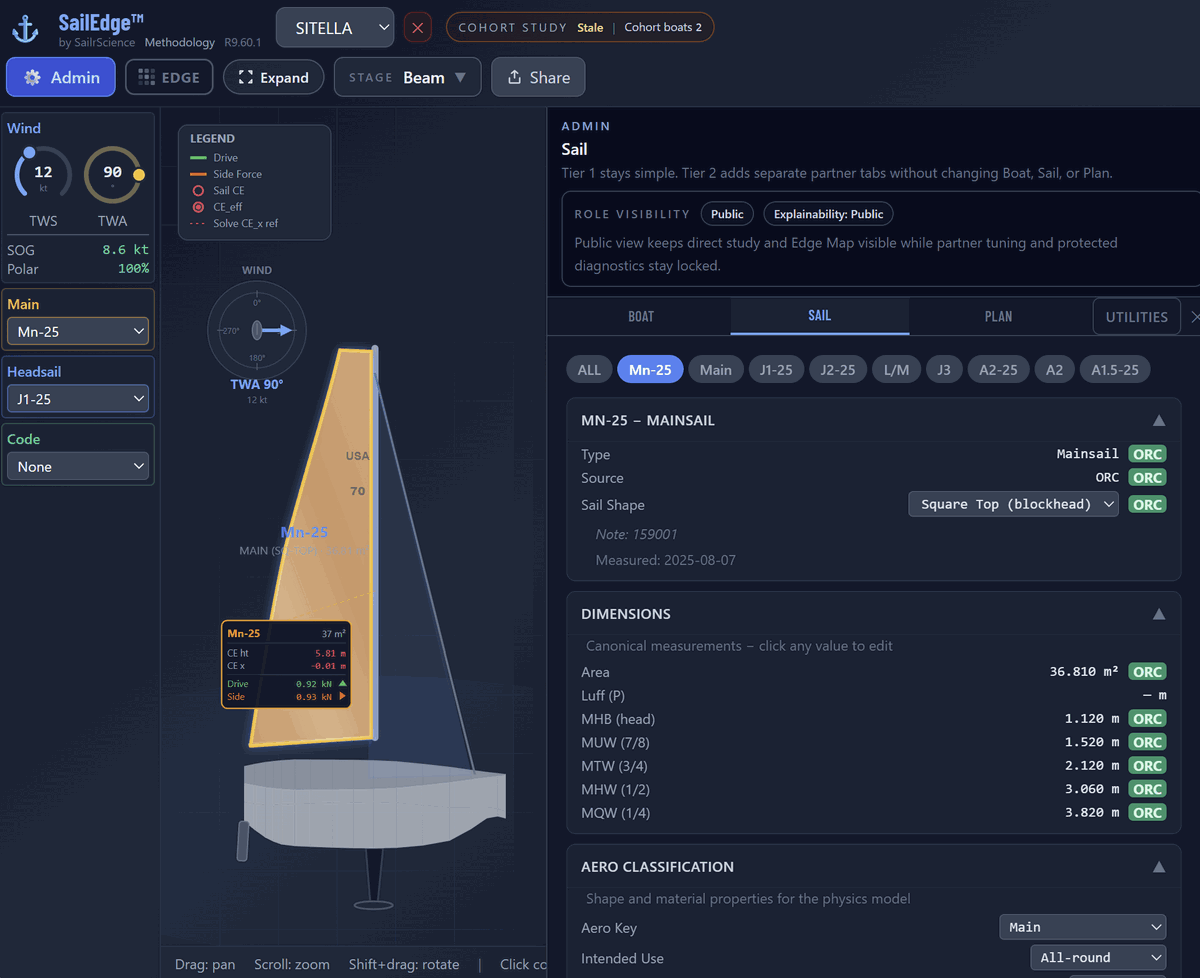
SailEdge Sail Tab with 3D view — Mn-25 mainsail highlighted in 3D model, ORC dimensions and Aero Classification visible, showing the sailmaker’s view of sail geometry and material properties
Mn-25 mainsail highlighted in the 3D view — ORC dimensions and Aero Classification visible.

Step 3

The Rep and the Customer

The rep loads a customer’s ORC certificate, imports the calibration profile, and runs a virtual sail: your loft’s planform geometry and aero characterization, fitted to the customer’s rig.

Planform physics matter here. A square-top main shifts the CE height and changes the depower curve — effects that depend on the rig geometry and stability of each specific hull. The model resolves those interactions automatically.

IP protection is built in. The physics computes server-side. Your protected tuning and implementation never reach the browser. Crew weight explainability is visible to your customers at Tier 1 — the RM supplement travels with the analysis, no Expert Mode required.

Hull selection now improves the starting point before sail tuning begins. A better reference hull means a more trustworthy edge map from the first study.

Two colleagues reviewing performance data together on a tablet in a modern workspace

Step 4

The Seasonal Cycle

New season, updated calibration. Your customers re-import the latest profile and their Edge Maps reflect your newest data. The relationship compounds — every cycle deepens the connection between your engineering and their results.


What you ship

Two artifacts. One workflow.

Sail Tuning Profile

Your design team’s sail-side characterization — planform geometry, bounded tuning, and construction insight validated against on-water testing. One profile serves every hull you support.

Boat JSON

What your customer receives: their rig, hull, and stability data with a virtual sail built from your design team’s aero characterization. Structured and ready to load.

One file you keep. One file they get.


Your Calibration Doesn’t Work Alone

Your sail tuning overlays a naval architect’s hull validation. When the hull physics are right and the aero calibration is right, the Edge Map converges across the full wind range. That’s the result your customer sees.

See the NA workflow →

Become a SailEdge Partner

Your design team’s knowledge. Every office in the network. Tell us about your loft.

Talk to Us See the loft methodology →