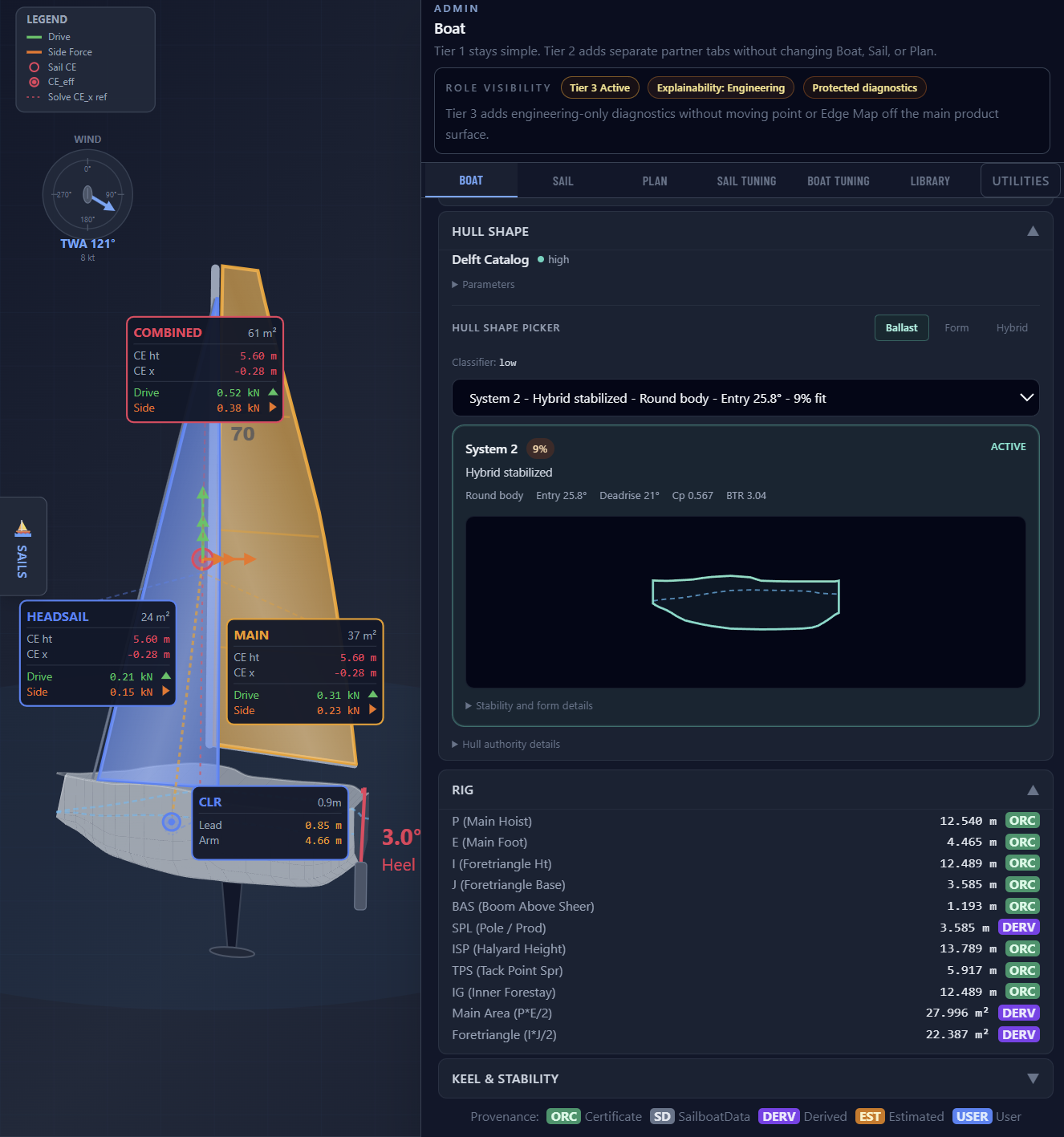
Your Hull Calibration. Every Sailmaker Builds On It.
Validate the live boat physics built on the DSH calm-water backbone with bounded follow-on lanes. Save the profile. Sail lofts overlay their calibration on your foundation.
SailEdge runs a VPP-class force-balance computation at every point in the wind
matrix — the same discipline used by ORC and naval architecture firms. Your
role is to validate the boat side of that equation — now live on a DSH-backed
calm-water backbone with bounded follow-on lanes — and save it as a calibration
that every sailmaker builds on.
From manual VPP harness to shared performance instrument.
Before SailEdge
Parse the ORC certificate with home-grown code
Stand up a VPP harness, configure hull and appendage inputs by hand
Run manual sweeps across conditions to isolate the performance domain
Present results in spreadsheets the client can’t interrogate
After SailEdge
Load the client’s ORC certificate — hull, rig, and stability build in seconds
Discuss the problem domain together: high heel, low HEI, weak reaching drive
Use Boat Tuning to simulate before-and-after — appendage, rig, or stability changes
Agree on the remit from a shared view of the physics, not a pitch deck
1. Load the Hull
ORC certificate in, hull geometry out. Displacement, stability, rig dimensions — verified against your design data.
2. Check the Boat Tab
Every parameter shows its source. ORC, Derived, Estimated — color-coded and traceable. Confirm it matches your numbers.
3. Inspect the Force Balance
Open point review or any Edge Map cell. Drive, side force, heel moment, CE position, whole-boat outcome, and hydro-lane disclosure are all visible for any condition.
4. Validate Across the Polar
One cell isn’t enough. Check upwind, reaching, downwind. When it converges across the range, the calibration is validated.
Step 1
Load and Inspect
Load the boat from its ORC certificate. Hull geometry, stability data, polar
performance — everything the certificate provides. Review the measurements,
confirm they match your design data, and identify where the model needs refinement.
The righting moment curve is retained directly from the certificate and drives
heel equilibrium at every point of sail — no substitution, no generic approximation.
Step 2
Evaluate the Force Balance
Open any Edge Map cell and inspect the force breakdown. Drive force, side force, heel
moment, Center of Effort position — the full picture of how the model resolves
that condition. Compare against your design data. Where the model diverges from known
behavior, you know where to tune.
The hull response layer now runs through a live DSH-backed runtime backbone: upright hull,
appendage, heel influence, sideforce/leeway, rudder interaction, and approved wave
resistance where the boat data supports it. Heel equilibrium is still solved
iteratively — the model finds the angle where heeling force from the sails
matches the boat’s righting moment, then reports exactly how much drive was
sacrificed if the rig depowered. These are the diagnostics you check against your
design data.
Boat Tuning now includes a Delft-style RM stability profile. Three knobs control
the heel-dependent righting moment correction: Form stability fraction, RM correction
onset, and GZ rolloff rate. These seed automatically when you select a Delft hull
family, then you adjust for your specific hull. Every tuning knob now explains what
it controls, what happens when you move it, and when to adjust it.
Learn more →
The Hull Efficiency Index normalizes hull resistance across platforms — a single
metric that lets you compare drag characteristics across designs regardless of
displacement class.
Crew weight operates as a bounded what-if within the Edge Map. More weight means more
righting moment upwind but more displacement to drag downwind, so the sensitivity is
course-dependent. The certificate stays anchored. The what-if shows you where it
matters and where it doesn’t.
Step 3
Tune the Hull
Open Boat Tuning and review the bounded DSH runtime families first: upright hull,
heel influence, appendage, sideforce/leeway, and rudder interaction. Adjust those
before reaching for transitional residual overlays, and shape the hull physics until
the Edge Map converges with your design data across conditions.
Every adjustment recomputes immediately. The ORC baseline stays anchored.
Step 4
Validate Across Conditions
One cell isn’t enough. Check the force balance across the polar — upwind,
reaching, downwind, light air, heavy air. When the model converges with your data across
the full range, the calibration is validated.
When a cell hits a physical constraint — hull speed cap, depower ceiling, or rudder
margin — the model flags it. Amber shading marks the cell and the detail card
identifies which constraint was active. That distinction matters: a divergence caused by
a model guardrail is different from a divergence caused by a calibration gap. One tells
you the model is protecting the result. The other tells you where to tune.
Ready to Calibrate
Hull shape selection, RM stability profiling, cross-section editing, and DSH
hydro authority — the full calibration workspace for building your
platform foundation.
Every cell in the Edge Map contains 107 computed attributes. At the professional
tier, you see roughly 65 of them — per-sail force attribution, CE geometry,
effective areas, confidence scoring, and clamp diagnostics. Engineering-grade access
under NDA surfaces the full set. The depth scales with the conversation.
Reproducibility
Same inputs. Same result. Every time.
A validated calibration is only useful if it’s reproducible. Load the same
ORC certificate, apply the same boat tuning profile, specify the same conditions
— the Edge Map produces the same output. No drift. No randomness. No
“it depends on the run.”
That’s what makes the calibration auditable. You can hand it to a partner
loft, a class measurer, or a client — and they can verify the result
independently.
Step 5
Save and Distribute
Save your work as a Boat JSON artifact or NA tuning profile — your IP,
portable and independent. Send it to your loft partners. They overlay their sail
calibration on your validated hull physics. The result: every Edge Map for that
platform is built on a foundation you approved.
Your calibration plus their calibration. Neither works as well alone.
Step 6
Class-Wide Impact
Approve a class calibration and every owner in the fleet benefits. Lofts building on
your platform know the hull physics are validated. Owners shopping for sails see Edge
Maps built on builder-approved data.
Your work multiplies across the ecosystem. One calibration, every boat in the class,
every sailmaker who serves them.
Design Cohorts
From single hull to design family.
You’ve validated the hull. FleetEdge™ shows you the fleet. Filter 1,000+
ORC-rated boats by designer, hull efficiency, or archetype. See how boats with
similar geometry cluster — and where the outliers sit.
Eleven performance archetypes group boats by multi-dimensional similarity:
hull form, rig scale, heel sensitivity, sail efficiency. When a boat’s
archetype doesn’t match its hull family, that’s a question worth investigating.
All analytics are anchored to patent-pending force-balance physics.