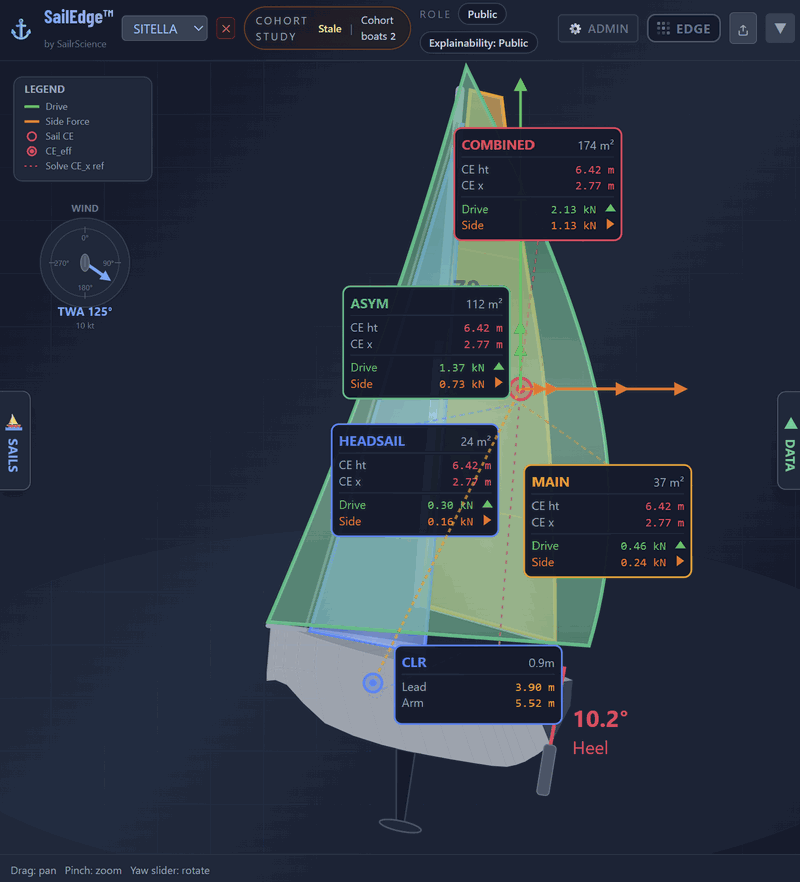
Same engine. Same force balance. The tiers control how deeply you can inspect the computation — from the Edge Map delta to per-sail attribution, whole-boat outcome, and bounded professional tuning surfaces.
SailEdge runs a VPP-class force-balance computation at every point in the wind matrix.
Drive force, side force, heel equilibrium, resistance, depower — solved iteratively
for every sail combination in every condition. The same computational discipline used by
ORC and naval architecture firms, applied to your boat from your certificate. The tiers
don’t change the physics. They change how much of it you see.
The Edge
72 cells. One full force-balance solve per cell. A 907-formula engine behind every answer.
Expert Mode
Same 72 cells. The same solve, but with per-sail attribution, CE geometry,
whole-boat outcome, confidence scoring, and clamp diagnostics opened up.
Engineering
Same 72 cells, by arrangement under NDA. Complete solver-state visibility for
every sail in every condition.
Upload your ORC certificate. Your boat loads with your full sail inventory. Run
Edge Map studies across every wind condition. Green cells, red cells, quantified
deltas — every what-if question answered, anchored to your ORC baseline.
Tap any cell and the detail card shows you the speed delta, the sail selection, the crew
weight effect, and the conditions that produced it — enough to make the decision
and understand why the model made the call. Crew weight what-if is here too — one
checkbox, no Expert Mode required.
Expert Mode opens the force-balance layer. Every cell expands from a speed delta into a
full diagnostic: per-sail drive and side force, CE geometry, effective areas, heel
equilibrium, whole-boat outcome, wave-lane disclosure, and confidence scoring. Roughly
the same 72 cells, but with the diagnosis layer opened up. The delta stops being a color
and starts being a diagnosis.
Sail tuning, boat tuning, campaign presets, and portable calibration profiles are
available as bounded professional controls. Sailmakers work on the sail side. Naval
architects review the live DSH runtime hydro families and bounded residual overlays.
Everything computes server-side. The ORC baseline stays anchored. Invalid
configurations are flagged, not hidden. Features like crew weight what-if that
started in the expert layer have graduated to Tier 1 — because the physics are
stable enough for every subscriber.
Boat Tuning now includes a Delft-style RM stability profile for form vs ballast
heel tuning, a geometry-first cross-section editor with Beam scale, Sheer lift,
Rail lift, and Keel drop, and section-aware 3D review. Save hull-section editing
as a portable JSON artifact.
See hull tuning in action →
Expert Mode — per-sail force breakdown with CE positions, drive and side forces, combined CE, and CLR.
Who it’s for
What each tier can do
Racer
Sailmaker
Naval Architect
Edge Map studies
✓
✓
✓
Crew weight what-if
✓
✓
✓
Per-sail force breakdown
✓
✓
✓
Sail tuning and overlay profiles
Read-only
✓
—
Boat tuning (DSH hydro review)
—
—
✓
Save and distribute profiles
—
✓
✓
Campaign presets
Loft-supplied
✓
—
Fleet-wide calibration
—
✓
✓
Delft Hull Shape Picker
✓
✓
✓
RM Stability Profile
—
✓
✓
Cross-Section Editor
—
✓
✓
Tuning never changes your ORC certificate data.
Tuning parameters shape how the model interprets your boat’s physics.
The certified polar grid, the righting moment curve, the rig dimensions —
those stay exactly as issued, regardless of what you adjust in Sail Tuning
or Boat Tuning.
Your certificate is the floor. Expert Mode works above it. Protected
partner implementation stays server-side.
Professional access
The right tool for every role
For Sail Lofts
Tune how the runtime represents your sails. Save your calibration as a portable
Sail Tuning Profile — it travels across any boat your customers bring in.
Campaign presets let you package your recommended tuning in one click.
Per-cell force breakdowns and whole-boat outcome show exactly where your sails
win and why. Every customer who loads your profile sees an Edge Map built on
your data.
Your hull data shouldn’t stay in your design files. Boat tuning profiles
let you encode your platform knowledge into SailEdge™ — starting with
the live DSH hydro families and only reaching for residual overlays when needed.
Validate the model against known behavior. Save the profile. The class fleet
benefits.
Expert Mode isn’t just for lofts. If you read VPP papers, argue about
upwind sail trim at the dock, and want to know exactly why cell 8 went red
— this is for you.
Experiment on top of your loft’s calibration. Explore force breakdowns,
whole-boat outcome, and confidence cues cell by cell. Build your own campaign
presets for your racing conditions.