Whether you have basic sail measurements, detailed cut sheets, or proprietary
loft data — SailEdge™ by SailrScience meets you where you are. We extract the polar,
the geometry, and the stability curve, then build your Digital Twin and Edge Map.
Forces, balance, heel, and speed deltas across every sail and every condition.
Behind every step is a full force-balance computation — drive, side force, heel
equilibrium, resistance, depower — solved iteratively for every sail in every
condition. Your ORC certificate sets the baseline. The physics runs on top of it.
How it works
1
ORC in
Upload your ORC certificate. Your boat loads in seconds — hull, rig, polars, and sail inventory.
2
Digital twin built
Your certificate becomes a living performance model. Every computation traces back to what ORC certified.
3
Edge Map decisions
Compare sail plans. Green where you gain. Red where you don’t. Click any cell to see why.
Certificate integrity guaranteed.
Your ORC certificate data is preserved exactly as issued. No silent edits. No normalization.
The baseline you uploaded is the baseline every computation runs against.
ORC INTL
Beneteau First 40
USA 40219
Upload
Boat
Sail
Plan
Mdl
BoatORC
SailORCUser
PlanDefault
Load
Analyze
Three ways in
ORC certificate? Cut sheets? Loft data? One Edge Map out.
I have an ORC certificate
You have your ORC cert and basic sail measurements — luff, leech, foot, LP.
No cut sheets, no problem. The model classifies your sails, builds a planform
from basic geometry, and runs regime-aware aero. You get a directional Edge Map
showing where each sail helps and where it doesn’t.
Your sailmaker’s cut sheets add real planform geometry — ORC measurement
stations, chord widths, roach distribution. The model builds stacked-trapezoid
shapes, computes per-sail forces, models sail interaction, and produces a full
physics breakdown behind every Edge Map cell.
Expert Mode gives your design team tuning controls on top of the same
physics engine. Sailmakers calibrate sail coefficients. Naval architects
validate hull response. Save named profiles and distribute calibrated
Edge Maps to every client on the roster.
Drop in your ORC HTML certificate. Your boat loads in seconds — hull dimensions, rig measurements, sail inventory, and full polar table. No forms. No waiting.
2
Pick a Study — or Build Your Own
Pre-loaded Sail Studies cover common racing questions: upwind headsails, Code Zero evaluation, kite selection, and more. What happens if I sail with 7 crew instead of 8? One checkbox answers that too. Or build your own comparison — choose baseline sails, test sails, and define the wind regime.
3
See Your Edge
Your Digital Twin, your Edge Map, and forces across every condition. Green where you gain. Red where you don’t. Click any cell to see why.
Have cut sheets or loft data? Add them for deeper analysis — per-sail force breakdowns, planform-accurate CE, and partner-tuned coefficients.
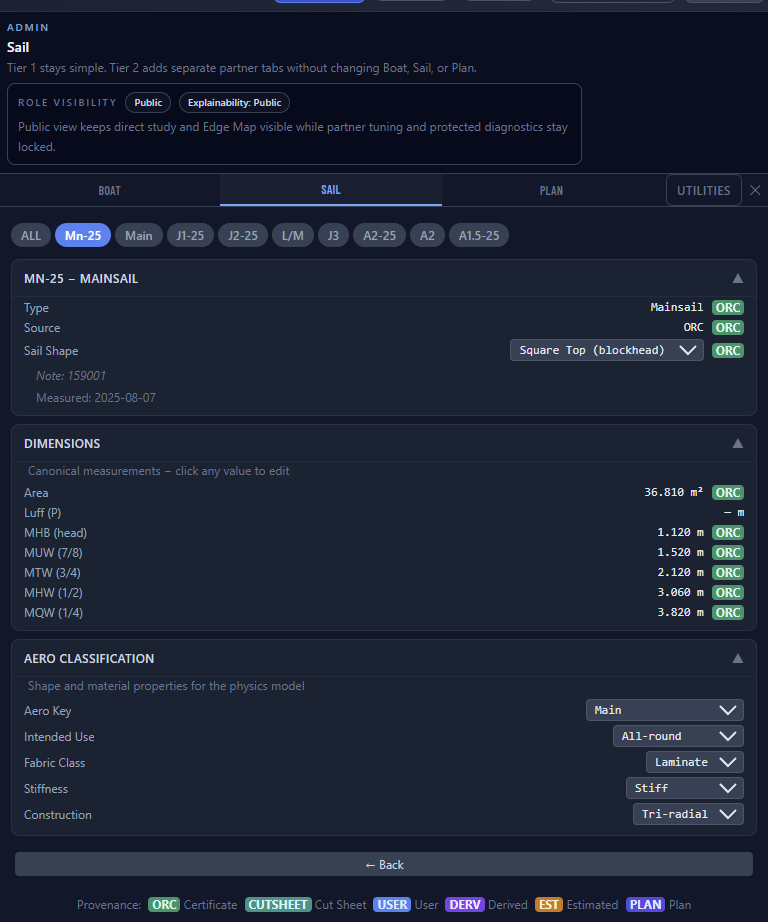
Every parameter shows its source. ORC, SailboatData, Derived, Estimated, User — color-coded and traceable.
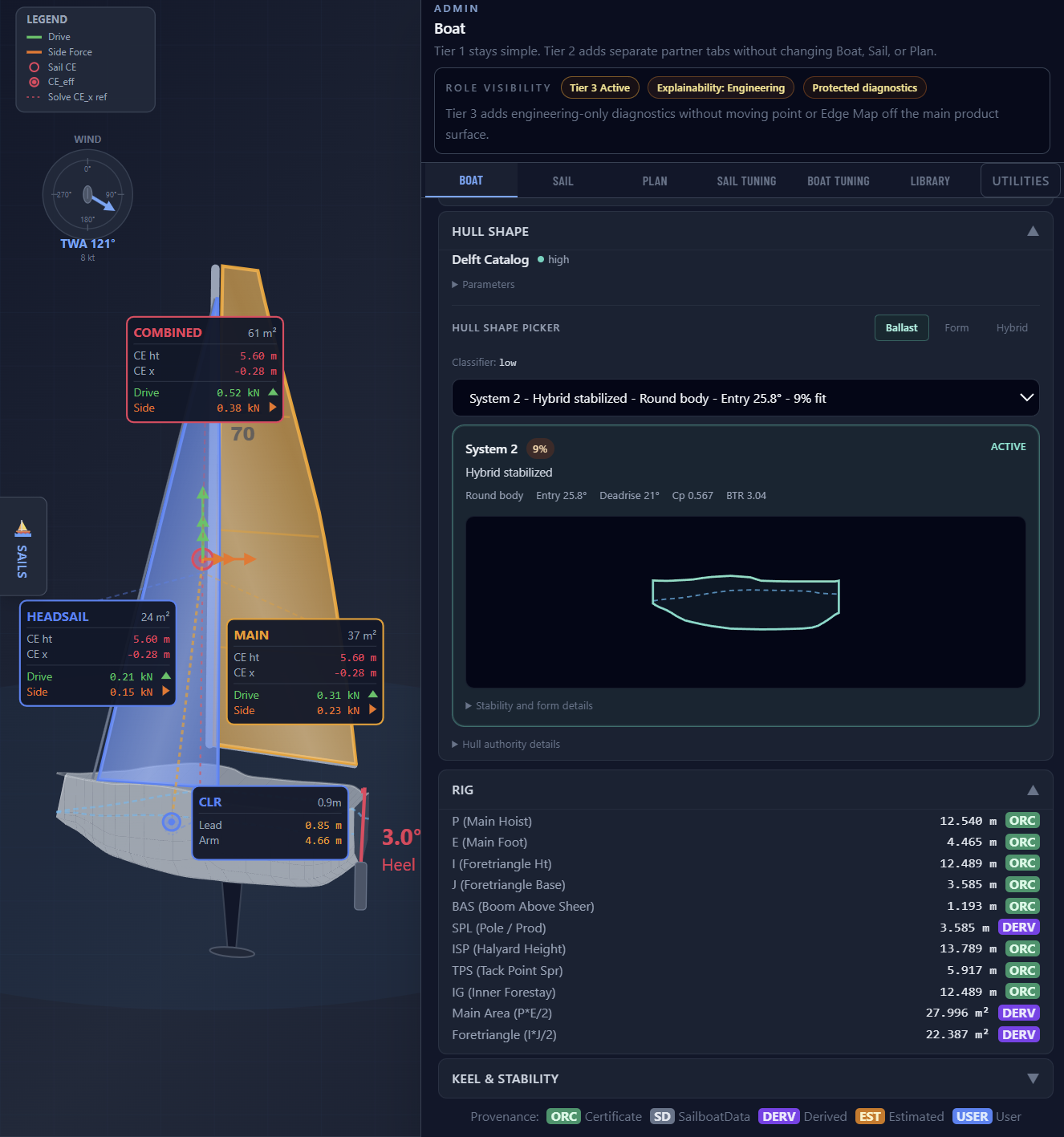
Choose from ranked Delft Series hull references on the Boat tab. The Hull Shape picker
shows the selected hull with cross sections visible inside the hull outline. Switch between
Ballast, Form, and Hybrid stability modes to see which hull family matches your boat.
Learn more about hull selection →
You just picked up a Beneteau First 40 — a Farr design with a proven ORC track
record. She came with a main and a genoa. The certificate says she should be fast,
but you’re leaving speed on the table in half the wind range.
Step 1. We read your ORC certificate. That’s your baseline —
72 cells of certified performance across the standard Edge Map wind matrix.
Step 2. You tell us what sails you have. Main and genoa. The Edge Map
lights up: green where your current inventory covers the baseline, gaps where it doesn’t.
Step 3. You add a Code Zero to the what-if slot. The reaching cells at
TWA 60–90 in 6–12 knots flip from gap to green. Average gain: +0.55 kt across
18 conditions.
That’s your first upgrade — quantified before you call the sailmaker.
1. Your ORC certificate — the baseline both sides trust. 2. Your SailrScience Boat Certificate — every measurement, every source tagged. 3. Your Edge Map Report — the deltas that show where the new sail helps and by how much.
The sailmaker brings the fabric and the design. You bring the data.
The conversation starts at specifics, not guesswork.
If your loft is a SailEdge partner, you may already have a calibrated sail asset
waiting — their tuning, your boat, one tap to load.
Inspect Everything. Trust Nothing Blindly.
Your Digital Twin is built from data — and every data point is visible.
The Admin panel organizes your boat into four tabs: Boat (hull, rig, keel,
stability), Sail (inventory with areas, dimensions, and dates), Plan (active
configurations with sheeting angles), and Model (the physics parameters driving
your predictions). Every value shows its provenance badge — ORC, User,
Derived, Estimated, or Plan — so you know exactly where it came from
and how confident to be in it.
The Edge Map flags uncertainty the same way. Cells where the model is less confident show amber indicators with plain-language explanations — so you know when to trust the number and when to dig deeper.
Every dimension, every source — tagged and traceable with provenance badges.
850K+Predictions per boat
907+Physics formulas
8+Sail types modeled
5Provenance sources
See Where Your Edge Lives.
Your Digital Twin feeds directly into the Edge Map — a grid that shows how
every sail in your inventory performs against every wind condition. Green cells
where you’re faster than the ORC baseline. Red where you’re slower.
Gray where the physics says you can’t go. One view. Every sail. Every angle.
The answer to “is this sail worth it?” is a color on the grid.
Your ORC HTML certificate — that’s it to get started. Your boat loads with full polar table, sail inventory, and rig measurements. Have cut sheets? Upload those too for per-sail force breakdowns and planform-accurate geometry. Not sure what depth your data supports? Upload what you have — the app tells you.
What you get
A Digital Twin of your boat. An Edge Map for every sail comparison. Pre-loaded Sail Studies for common racing questions. Save your boat and come back anytime. Add cut sheets for per-sail force breakdowns, CE positions, and whole-boat outcome. Partners with Expert Mode access get calibrated analysis backed by their Sail Tuning Library or Boat Tuning Library on top of the live DSH runtime.
Take It With You.
Your ORC certificate defines your boat. SailEdge extends it. The Boat
Certificate is a companion document — your Digital Twin in portable form,
covering the sail-specific analysis that ORC doesn’t: per-sail performance
deltas, coverage gaps, CE positions, and recommended configurations.
The Edge Map Report shows the before-and-after for any sail change, with the
numbers behind the color. Bring both to the loft alongside your ORC cert and
the conversation starts with shared data.
Share it in one tap. Screenshot, performance summary, and a direct link to
the live analysis — sent to your sailmaker, your crew, or your tactician.
They open the link and see exactly what you see.
The depth of your deliverables matches the depth of your data. Start with
directional gaps from your ORC certificate. Add cut sheets for per-sail force
breakdowns. Partner lofts with Expert Mode
access deliver calibrated analysis backed by their own tuning libraries.
Want to isolate a single question — one sail, one wind range, one decision? Sail Studies let you do exactly that. Pick from a pre-loaded study or build your own — right in the app.
Upload your cert. See your edge in seconds.
Your ORC certificate is all you need to get started.